How to reduce COD failures without losing genuine buyers
A good COD confirmation filters out orders that will never be paid for and feels like a friendly check-in to everyone else.
Contents
- The trade-off every COD check has to manage
- Why COD orders fail
- What a good confirmation step must do
- Comparing the confirmation methods
- Match the check to the risk
- What to say in the confirmation message
- Metrics that prove it is working
- COD confirmation checklist
- Frequently asked questions
- How LoopChat helps
COD failures are orders placed on cash on delivery that never turn into cash: the customer refuses the parcel, cannot be reached, or never meant to buy. The fix is a short confirmation step between checkout and dispatch that weeds out those orders while genuine buyers barely notice it. This guide covers how to choose the method, how strict to be for each order and exactly what to say.
The trade-off every COD check has to manage
Every extra check you add catches more bad orders and also annoys more good customers. A phone call to every buyer will catch almost everything, but it is slow, expensive and irritating for the shopper in Jaipur who simply wanted her kurta. No check at all is frictionless, but you end up paying to ship parcels that come back.
So the aim is not maximum verification. It is the lightest check that still separates real buyers from orders that will fail. For the full picture of what failed COD orders cost once they ship, see our guide on how to reduce RTO in Shopify stores.
Why COD orders fail
Failed COD orders fall into four broad groups:
- No real intent. Impulse orders placed late at night, duplicate orders, orders placed "to check", and the occasional prank.
- Change of mind. The customer found it cheaper elsewhere, or the excitement faded during a five-day transit.
- Address and availability problems. Wrong pincode, missing flat number, nobody home, or a delivery slot that clashes with office hours.
- No commitment. COD feels free to choose. Because nothing was paid, there is nothing lost by refusing. That same low commitment is part of why COD shapes checkout behaviour so strongly, as we explore in why customers abandon carts in India.
All four are far easier to catch in the first hour after the order than at the doorstep. A customer who did not mean to order will say so when asked. A customer who typed the wrong pincode will fix it when shown the address. That is the whole case for confirming early.
What a good confirmation step must do
Judge any method against four tests:
- Filter out orders that will never be delivered revenue.
- Keep genuine buyers. If real customers drop out at confirmation, you have moved the loss, not removed it.
- Scale with risk. A ₹399 phone cover from a repeat customer and a ₹6,000 order from a new number in a pincode with past failures should not get the same treatment.
- Feel like service. The message should read as "we want to get this to you", not "we suspect you".
Comparing the confirmation methods
| Method | Strengths | Weaknesses | Best for |
|---|---|---|---|
| Manual call | Catches address details and doubts | Slow, needs staff, hard in peak sales | High-value or flagged orders |
| Automated call (IVR) | Scales without staff | Feels robotic, unknown numbers get ignored | Backup for non-responders |
| WhatsApp message | One tap, runs automatically, customer replies in their own time | Needs a WhatsApp number and approved template | Default for most orders |
| SMS | Reaches any phone | Plain text, no buttons, easy to miss | Fallback when WhatsApp fails |
For most Indian D2C stores, WhatsApp is the practical default. Customers already use it to talk to shops, the message arrives with your business name, and confirming takes a single tap. Meta's utility template category is designed for messages sent in response to a customer action such as an order confirmation, and utility templates can carry quick-reply buttons like "Confirm order" and "Change address". Our guide to getting WhatsApp templates approved explains how to pick that category correctly. You can build the branching (confirm, change, cancel) in a no-code flow, as described in our guide to WhatsApp flows, and our comparison of bot flows and AI replies explains when a fixed path beats a free-form answer.
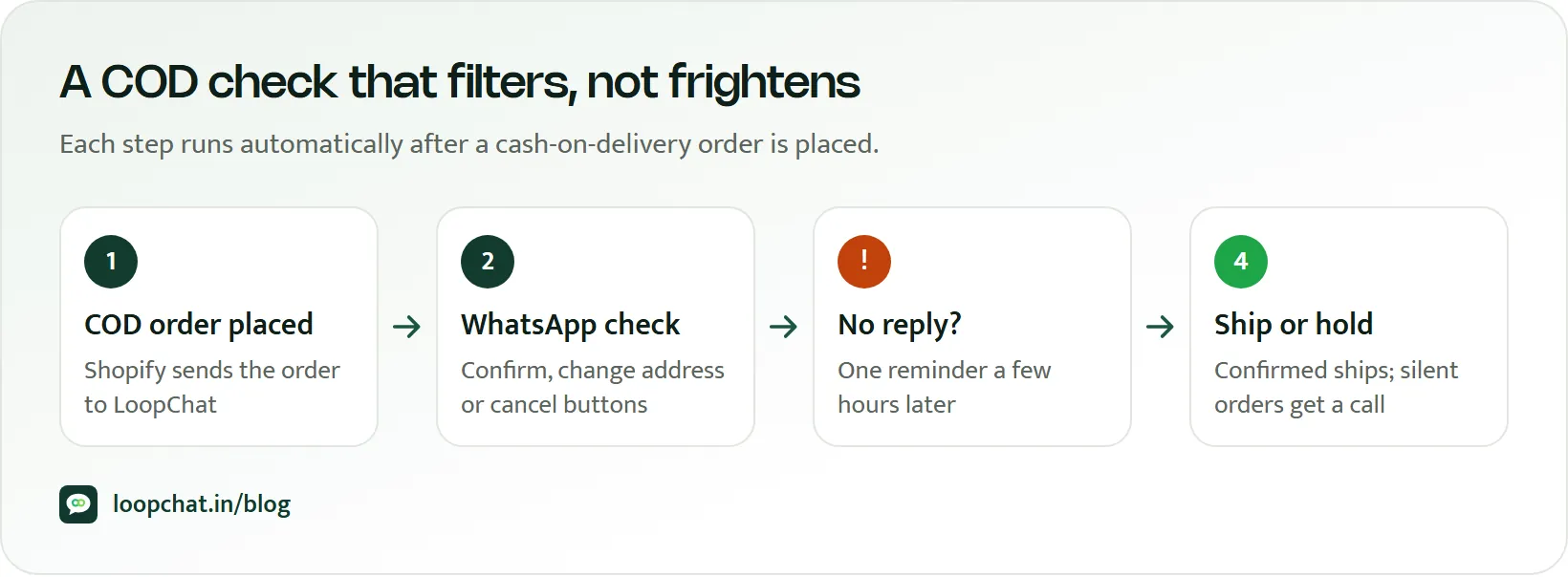
Most stores end up combining methods: WhatsApp first, then a call only where it is needed.
Build in retries before you cancel
Cancelling every order that does not respond to the first message throws away good customers who were in a meeting, travelling or simply asleep. A sensible sequence:
- Send the confirmation as soon as the order is placed.
- If there is no reply after a few hours, send one short reminder.
- If there is still no reply, call, or hold the order for a call if it is high value.
- Only then cancel, with a polite message explaining how to reorder.
Each reminder is another template message, so keep the sequence short. Our explainer on the October 2026 WhatsApp pricing change covers how those messages are charged.
Match the check to the risk
Not every order deserves the same scrutiny. Sort them into tiers:
- Low risk: returning customers with past deliveries accepted, low cart values, reliable pincodes. A single WhatsApp confirmation, or even ship-then-notify, is enough.
- Medium risk: first-time COD buyers with normal cart values. WhatsApp confirmation with a reminder.
- High risk: high cart value, a new number, pincodes with repeated failures, many units of one item, or mismatched names and addresses. WhatsApp confirmation plus a call, or a request for a part payment.
Escalate to a human only when there is no response or a real risk signal. That keeps your team's calling time for the orders that need it.
What to say in the confirmation message
The best confirmations are short, specific and easy to act on. Include:
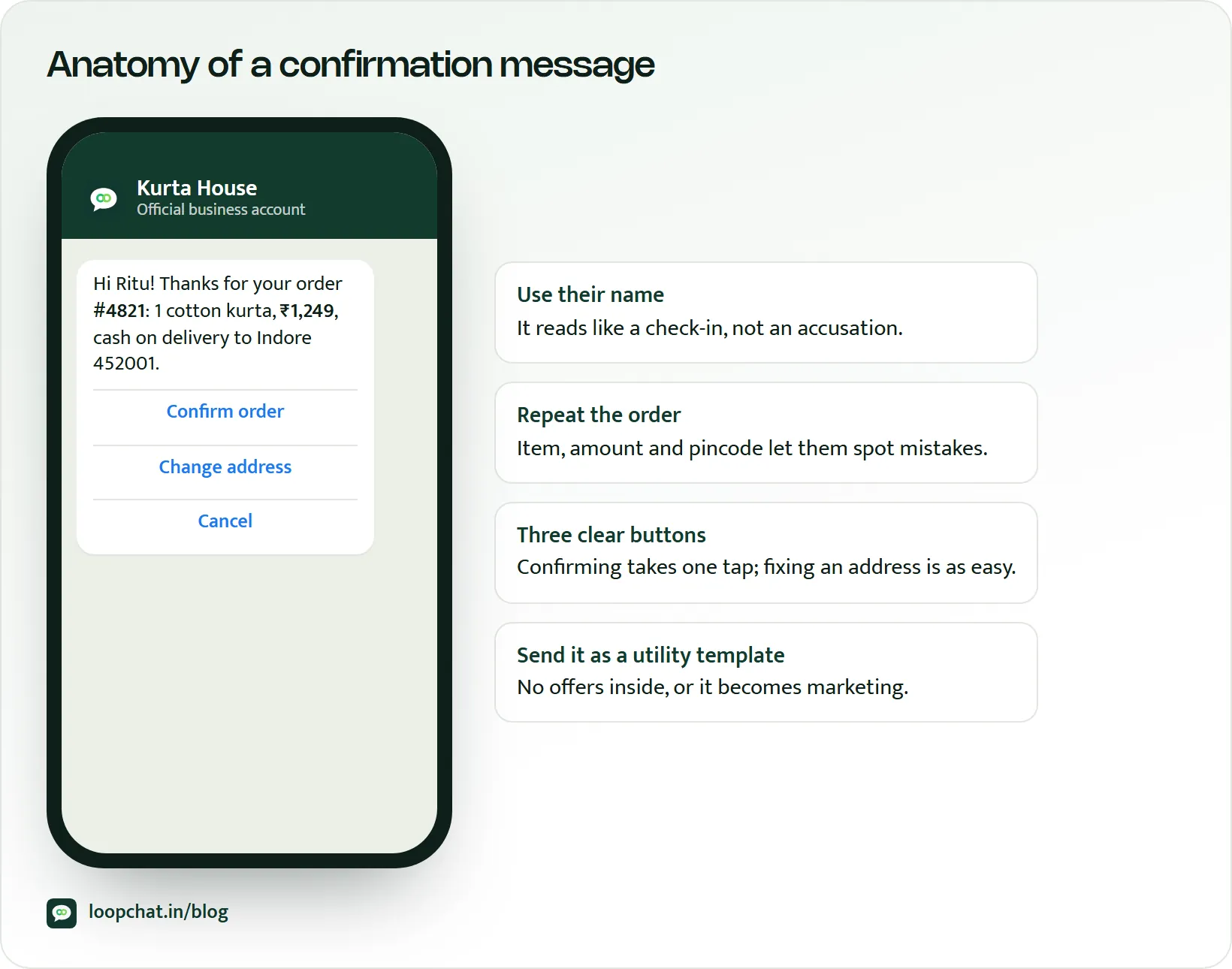
- The order itself: product name, quantity, total to pay in ₹, and the delivery address.
- An expected delivery window, so the customer knows when to be available.
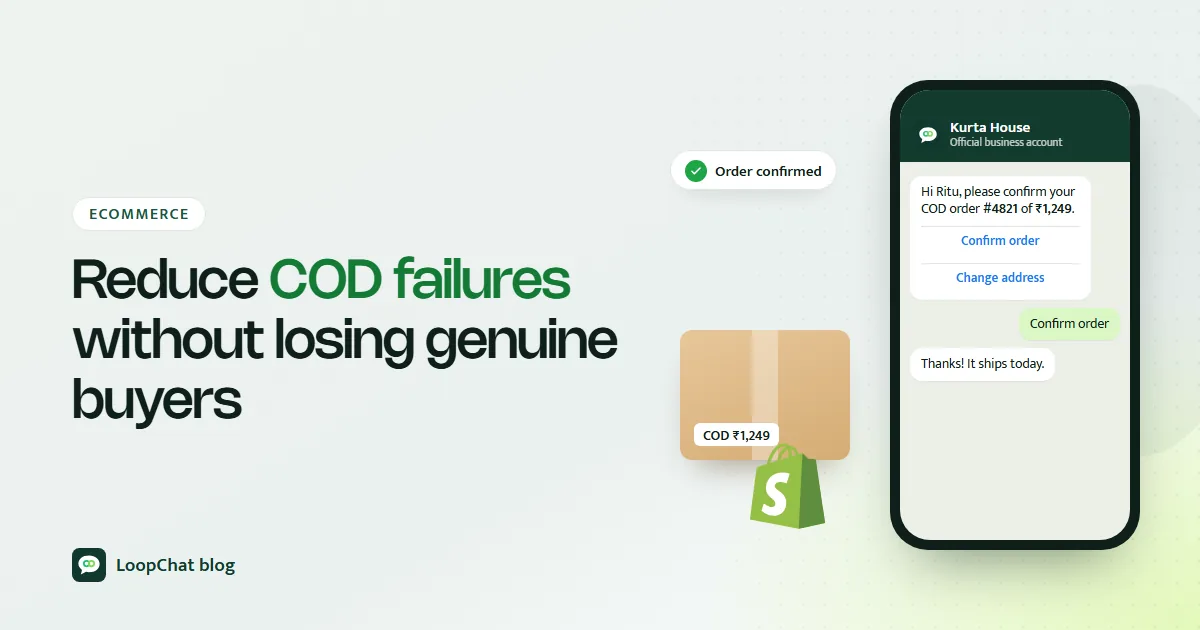
- One-tap buttons: Confirm, Change address, Cancel.
- A self-service fix. If the address is wrong, let the customer reply with the correction instead of asking them to call support.
- A friendly tone, in the language your customers use. Many shoppers are more comfortable in Hindi or Hinglish.
An example:
Avoid anything that sounds like an accusation ("verify you are a real customer") and avoid long blocks of terms and conditions. You can also offer a small incentive to pay now by UPI with a payment link, which turns some COD orders into prepaid ones before they ship. If you are weighing what prepaid costs you, our explainer on UPI merchant charges sets out the numbers.
Metrics that prove it is working
Track these monthly, and compare against the period before you started confirming:
- COD failure rate: failed or refused COD orders as a share of shipped COD orders. This is the core number.
- Confirmation response rate by channel: how many customers respond on WhatsApp versus calls, so you know where to invest.
- Checkout-to-confirmed conversion: if this drops sharply, your confirmation is too strict or too slow and is losing real buyers.
- RTO rate for confirmed versus unconfirmed orders: the clearest proof that confirmation actually prevents returns.
- COD-to-prepaid switches: orders moved to UPI after the confirmation message.
COD confirmation checklist
- Make WhatsApp the default confirmation channel and keep calls for non-responders and high-risk orders.
- Tier checks by risk instead of one rule for every order.
- Keep the message short, specific and one tap.
- Add a reminder and a call before cancelling anyone.
- Let customers fix their address or delivery details themselves.
- Review failure rate, response rate and checkout-to-confirmed conversion every month, not just RTO.
Frequently asked questions
Will a COD confirmation step reduce my conversion rate?
It should not reduce delivered orders if the step is quick and friendly. Watch your checkout-to-confirmed conversion: if genuine buyers are dropping out, shorten the message, add a reminder before cancelling, or loosen checks for low-risk orders.
Is WhatsApp better than a phone call for confirming COD orders?
For most orders it is more practical, because it is automatic, works at any hour and takes one tap. Calls still earn their place for high-value or flagged orders and for customers who do not respond on WhatsApp.
Does it cost money to send COD confirmations on WhatsApp?
Meta charges per delivered template message, with rates that depend on the category and country, and these charges sit outside any software plan. Check Meta's current pricing and estimate your volume with the WhatsApp pricing calculator.
How LoopChat helps
LoopChat's Shopify and WooCommerce automations send a COD order confirmation on WhatsApp as soon as an order is placed, with follow-up reminders you configure in the visual flow builder. Replies go to a shared inbox, where your team can update addresses or call customers who need a human, and an AI agent can answer routine questions such as "when will it arrive" in English, Hindi or Hinglish before handing over. You can also send payment links to offer prepaid at the confirmation stage.
Store connections and flows are included on the Sprint and Turbo plans; see pricing for details. Ready to try it on real orders? Start a 15-day free trial or book a demo.
Sources
- Meta for Developers: Utility templates (accessed October 2026)
- Meta for Developers: WhatsApp Business Platform pricing (accessed October 2026)